Termius - Modern SSH Client
- 4.7
- Rating
- 1.00M
- Installs
- Free
- Price

 Analysis by App-foxy
I noticed the appeal of Termius almost immediately: it makes remote terminal work feel less like a chore squeezed onto a phone screen and more like a practical part of a normal workflow. As a Business app from Termius Corporation, it brings SSH, SFTP, Telnet, and Mosh into one mobile workspace instead of asking me to juggle several narrowly focused tools. That combination matters most when I need to check a server away from my desk, make a quick correction, or transfer a file without opening a laptop.
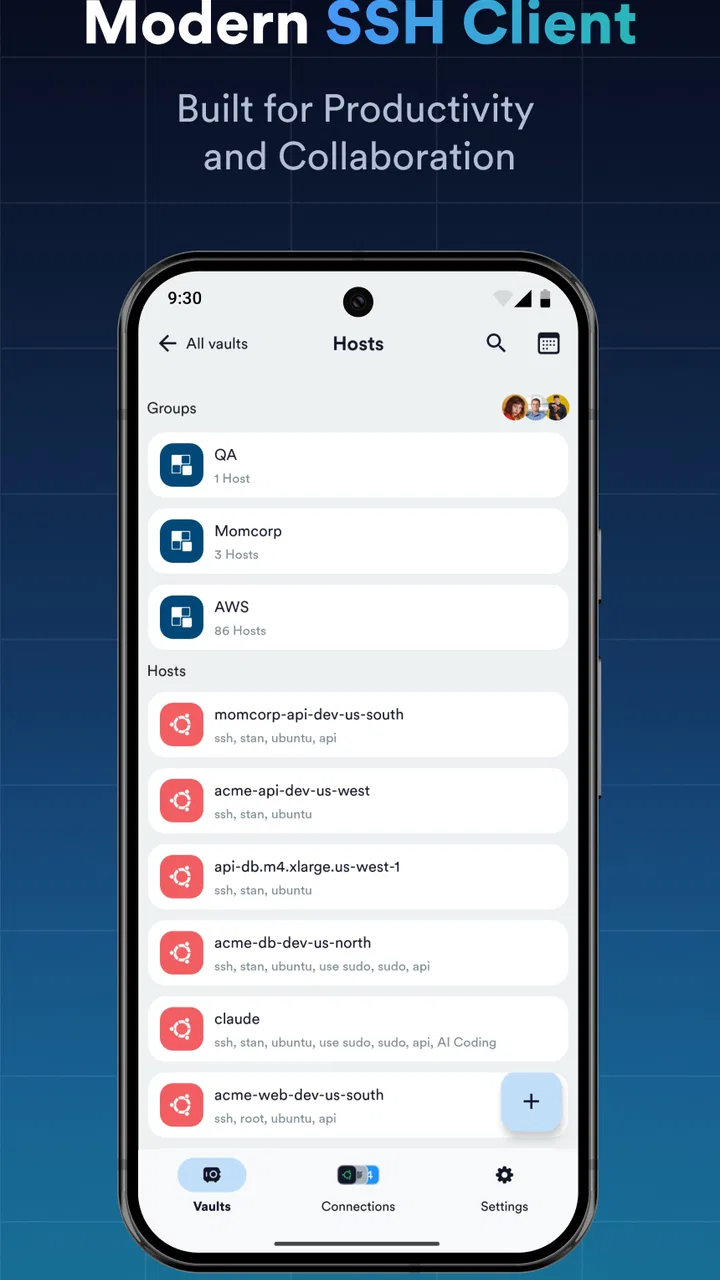
My first impression was helped by the clean interface. A terminal app can easily become a wall of tiny text and intimidating controls, but this one is designed with a much friendlier entry point. It is free to start, rated for Everyone, and available on Android devices running version 8.0 or later. The current version is 7.5.5, and its long presence in the category suggests that it is not simply a flashy newcomer looking for attention.
From first-week appeal to lasting usefulness
During the first week, the strongest benefit is convenience. I can keep several remote destinations within reach, open a session, and get to the command line without rebuilding the connection process each time. That sounds basic, but it changes how willing I am to handle small jobs. A quick service check, a log inspection, or a configuration adjustment no longer requires postponing the task until I am back at a full workstation.
You May Also Like

 Blood Strike: 2.5 Anniversary
Blood Strike’s Loadouts Turn Every Drop Into a Tactical Gamble
A close look at Blood Strike’s custom loadouts: how fast access to signature weapons reshapes its battle royale rhythm, rewards preparation, and narrows the gap between fights.

 Pandora - Music & Podcasts
Pandora’s Music Is Easy to Start, but Harder to Recover
Pandora’s strength is its low-effort path from a seed to a station. Its weak spot is how much confidence it asks you to place in connection, setup, and quiet recovery.

 8 Ball Pool
 Is Built on Rivalries, Rematches, and Routine
A close look at the rivalries, rematches, shared routines, and unanswered safety questions that turn a quick pool match into a persistent mobile community.

 Samsung Music
’s Quiet Strength Is Playing What You Already Own
Its reach comes less from spectacle than from dependable access to a personal library. That simplicity is both the app’s strongest retention engine and its ceiling.

 AccuWeather: Weather Radar
AccuWeather Review: A Quick, Clear Forecast for Everyday Decisions
For everyday plans, the best forecast is the one you can understand quickly. AccuWeather makes rain timing, radar, and local conditions easy to act on, with a few trade-offs.

 Hill Climb Racing
Why Hill Climb Racing Still Turns Crashes Into One More Run
A tiny car, a bumpy hill and one more upgrade: Hill Climb Racing keeps resurfacing because its simple chaos makes every near-miss feel personal.
More From Our News Desk



The built-in SFTP support is especially useful in this early stage. Terminal access and file movement are often treated as separate activities on mobile, so having both available in the same app makes a practical difference. I can investigate a problem, locate the relevant file, and move it when appropriate without switching to a second client. For a developer or administrator, that reduces the mental overhead around short, urgent tasks.
Mosh is another reason the app can feel more capable than a basic SSH utility. When a connection needs to survive less-than-perfect mobile conditions, a protocol designed for roaming and intermittent connectivity can be more comfortable than repeatedly rebuilding a session. I would not treat that as a guarantee that every connection will remain usable, but it gives the app a more thoughtful place in a mobile toolkit.
Telnet support broadens compatibility, although I see it as a specialized option rather than the reason most people should install the app. SSH is the sensible default for modern remote administration. Telnet is relevant when an older device or particular network service still requires it, but I would not choose an insecure legacy protocol simply because it is available. The presence of multiple protocols is useful; choosing the right one remains the user’s responsibility.
The first-week experience also reveals an important trade-off: a polished mobile interface can make remote access feel approachable, but it cannot remove the risks of running commands on a real system. A larger desktop terminal gives me more room to review output and edit commands. On a phone, I need to slow down, check the destination carefully, and avoid treating a compact screen as permission to work carelessly.
A realistic mobile workflow
Imagine I am away from my desk when a website begins responding slowly. I can open a saved remote session, inspect a process or log, and determine whether the issue is local to the server or something that needs deeper investigation. If a small text-based configuration change is required, the app lets me work directly rather than merely observing from the sidelines. If I need to retrieve a file for closer inspection, SFTP keeps that next step nearby.
That scenario shows where the app earns its place: not as a replacement for every desktop administration session, but as a rapid-response tool. I would use it for diagnosis, short interventions, and monitoring-related checks. I would be more cautious about a long maintenance window involving complex commands, extensive output, or delicate edits. Mobile access is excellent for reducing delay; it is not automatically the best environment for concentration.
One practical habit makes a big difference. Before entering a command that changes data, I verify the host and read the prompt rather than relying on muscle memory. A phone keyboard encourages fast tapping, and a familiar command can be dangerous when sent to the wrong machine. The app makes access easier, so I have to add the deliberate checking that a more spacious desktop setup naturally encourages.
What remains valuable after the novelty fades
After the initial excitement of having a full remote toolkit in my pocket wears off, the recurring value comes from reducing friction. I do not need the app to entertain me or offer a new workflow every week. I need it to open reliably, keep my destinations organized, and let me perform a small number of important actions without unnecessary ceremony. That is a more durable standard than a visually impressive first launch.
The app’s broad protocol coverage helps it stay relevant because my needs may change between servers and devices. SSH handles the normal secure administration case, SFTP covers file exchange, Mosh can be useful when connection conditions are unpredictable, and Telnet serves older or unusual equipment. I would rather have one familiar client that covers these situations than remember which separate mobile tool belongs to each one.
Its audience is wider than full-time system administrators. Developers who occasionally check a staging environment, technical support workers who need emergency access, students learning command-line administration, and small-team owners managing a hosted service can all benefit. The value is strongest for people who already understand the basics of remote systems and want mobility, not for someone expecting the app to explain every command or protect them from poor server practices.
The public response also gives me some confidence that the product has found a stable audience: it holds a 4.6 average from around 42 thousand ratings, with roughly 2.4 thousand written reviews and more than a million installs. Those figures do not prove that it will suit every workflow, but they do indicate that the app has moved beyond a niche experiment. I read that as evidence of recurring usefulness rather than a one-week novelty.
There is also a sensible distinction between “available for free” and “entirely without commercial pressure.” The app is free to download and use as an entry point, while in-app purchases range from $0.99 to $120.00 per item. That matters when comparing it with a minimal open-source terminal or a simple built-in client. Someone who only needs occasional SSH access may find a basic alternative sufficient, while a user who values a more unified workspace may consider paid options worthwhile.
Where maintenance enters the picture
A remote-access app is not something I can install once and forget forever. Servers change, credentials expire, host keys may need attention, and connection details can become outdated. The app can make those changes easier to manage, but it cannot eliminate the maintenance around the systems I connect to. That is the central long-term question: does the convenience of a single client outweigh the responsibility of keeping remote access organized?
For me, the answer is usually yes when I connect to several environments. A consistent mobile interface reduces the number of separate tools I need to remember. It also gives me a familiar place to start when an urgent task appears. However, users with one occasional connection may not gain much from a dedicated client with broader capabilities. If a browser-based console or a lightweight terminal already covers that single need, adding another app can create more clutter than value.
I would also establish a tidy naming system from the beginning. A label such as “production,” “staging,” or “home lab” is more useful than relying on a vague hostname, especially when several destinations have similar addresses. This is not a glamorous feature, but it is the kind of small organizational choice that determines whether the app remains comfortable after months of use. A remote client becomes more valuable as the list of destinations grows, provided that list stays understandable.
Another good habit is to separate routine inspection from high-risk administration. I use a mobile client confidently for checking status and handling limited, well-understood tasks. For destructive operations, large migrations, or changes that require comparing several files at once, I prefer a desktop environment where I can review more context. Termius gives me access; it does not make a small display equivalent to a full operations workstation.
The friction that becomes clearer over time
The most obvious source of fatigue is typing. Touch keyboards are acceptable for short commands, but long paths, flags, escaped characters, and repeated corrections become tiring. A physical keyboard remains faster and less error-prone for substantial terminal work. Anyone expecting to administer servers from a phone for hours at a time should reconsider the form factor before blaming the app for a limitation shared by nearly every mobile terminal.
Screen space creates a second limitation. Reading a compact status message is easy enough, but comparing long output or following a complex interactive program can become uncomfortable. I sometimes find myself scrolling more carefully than I would on a desktop, and that extra attention slows me down. The app is at its best when the task is focused and bounded, not when the terminal session becomes the main workplace.
There is also a mental cost to keeping remote access in a pocket. Because the app makes a server available almost anywhere, it can encourage reactive work at inconvenient times. That is useful during a genuine incident, but not every alert deserves an immediate command from a phone. I prefer to use it as a bridge until I can reach a better setup, unless the change is small enough that I can verify every step comfortably.
Protocol variety can create its own confusion for newcomers. SSH, SFTP, Telnet, and Mosh are not interchangeable labels for the same connection. Each has a different purpose and security profile, and choosing the wrong one can lead to a failed session or a poor security decision. The app makes these tools available in one place, but beginners still need a basic understanding of what their server supports and which method is appropriate.
The purchase structure may also affect how different users judge the experience. Someone who wants a straightforward, no-cost terminal may prefer a simpler alternative with fewer extras. Someone managing multiple environments may be more comfortable paying for additional capability, but should first decide whether those capabilities will be used regularly. I would not pay merely because the interface looks polished; I would pay only if the saved time repeats often enough to matter.
How it compares with usual alternatives
Compared with a bare terminal app, this client feels more complete because it combines remote shell access with file transfer and several connection methods. A minimal alternative can be perfectly good for one trusted SSH destination and may feel lighter for occasional use. Termius becomes more compelling when I want a repeatable workflow across different kinds of remote systems rather than a single command prompt.
Compared with a desktop SSH client, it wins on availability and loses on working space. A desktop remains the better choice for lengthy sessions, large logs, serious editing, and tasks where I need several windows visible at once. The mobile app wins when the question is, “Can I check or fix this now?” rather than, “Where should I spend the next three hours managing infrastructure?”
Compared with browser-based server consoles, it can feel more direct and less dependent on a particular hosting dashboard. That independence is useful when I work across different providers or connect to equipment outside a standard web panel. A browser console may still be preferable when emergency access is tied to the provider itself or when I need account-level controls that a terminal client does not replace.
For people who only transfer files, a dedicated SFTP tool may provide a more focused experience. Termius is better suited to users who want file movement alongside command-line access. That distinction is important: its strength is the connected workflow, not necessarily being the most specialized tool for every individual task.
Who should keep it installed?
I would recommend it to developers, administrators, technical support staff, and technically confident users who regularly need remote access away from a computer. It is particularly useful when several systems use different connection methods or when a quick inspection can prevent a small issue from becoming a delayed one. The free starting point also makes it easy to test whether a mobile terminal genuinely fits a person’s routine.
I would be less enthusiastic for someone who has never used a command line, owns no remote system, and expects a guided dashboard. The app is a client, not a course or a server-management service. It can present the connection cleanly, but the user still needs to understand authentication, commands, file locations, and the consequences of changes.
I would also suggest skipping it if nearly all work happens at a desktop and remote access is rare. In that case, the phone version may become an unused backup rather than a daily tool. Installing another app only makes sense when its availability changes what I can accomplish, not simply because it offers more functions than I currently need.
For families or shared devices, the Everyone content rating is reassuring from an age-classification standpoint, but that should not be confused with suitability for unsupervised server access. The important consideration is operational responsibility: a person with access to a remote machine should know what that access allows and should use the app accordingly.
My long-term verdict
What keeps this app installed is not the novelty of seeing a terminal on a phone. It is the repeated convenience of having SSH, SFTP, Telnet, and Mosh available in one place when a laptop is inconvenient. The interface lowers the barrier to a quick check, while the broader protocol support prevents it from becoming irrelevant after the first few experiments.
Its limitations are real. Touch typing, small screens, security decisions, and the temptation to perform complex work in an unsuitable setting all remain. I would not replace my desktop workflow with it, and I would not recommend paying for capabilities that do not match a user’s routine. Those caveats are exactly why I find the app more credible as a long-term tool: its value is practical, not magical.
Termius earns lasting space for me when I treat it as a mobile response kit rather than a complete operations center. It is there for the short session, the urgent check, the controlled file transfer, and the moment when waiting is more frustrating than working from a phone. If that situation occurs regularly, the app’s polished access and protocol range can become part of a dependable habit. If it does not, a simpler alternative will probably be enough.
My final recommendation is therefore positive but specific: install it if remote systems are already part of your life and mobility would save you time. Spend the first week organizing destinations and testing the connection methods you actually use, then judge it by the small tasks you complete month after month. The lasting value is not having every remote feature in your pocket; it is having the right access ready when a small problem cannot wait.
FAQs for Termius - Modern SSH Client
01What platforms does Termius support?
Termius is available for both Android and iOS devices, making it accessible to a wide range of users. Additionally, it supports desktop platforms, including Windows, macOS, and Linux. This cross-platform compatibility ensures that you can manage your SSH, Mosh, and Telnet sessions seamlessly, regardless of the device you are using.
02Is Termius secure for managing SSH sessions?
Yes, Termius takes security seriously by providing end-to-end encryption for your data. With features such as two-factor authentication and secure syncing of credentials and settings across devices, Termius ensures that your SSH sessions are protected from unauthorized access, maintaining the confidentiality and integrity of your connections.
03Can Termius handle multiple sessions at once?
Termius allows users to manage multiple sessions efficiently through its tabbed interface. This feature enables you to switch between different servers and connections quickly without losing track of your work. It's especially useful for IT professionals who need to handle several tasks simultaneously across various systems.
04Does Termius offer any customization options?
Yes, Termius offers a variety of customization options to enhance your user experience. You can personalize the terminal appearance, adjust fonts, and choose from different color schemes. Additionally, Termius supports custom keyboard shortcuts, allowing you to tailor the interface to fit your workflow and preferences.
05Is Termius free to use, or does it require a subscription?
Termius offers a free version with essential features suitable for basic SSH management. For advanced features like SFTP support, team collaboration tools, and more extensive customization options, a subscription to Termius Premium is required. The premium version provides enhanced functionality for users needing more comprehensive tools.
Pros
- Intuitive and user-friendly interface.
- Supports multiple sessions and devices.
- Secure with end-to-end encryption.
- Customizable themes and color schemes.
- Cross-platform synchronization available.
Cons
- Premium features locked behind paywall.
- Occasional connectivity issues.
- Limited offline functionality.
- Learning curve for beginners.
- Consumes significant battery life.

Termius - Modern SSH Client
Gallery